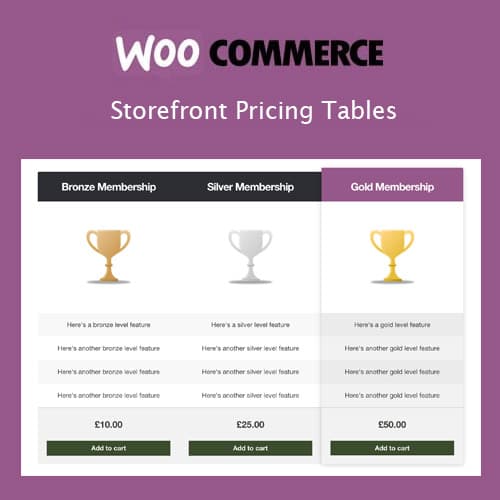
Add customizable pricing comparison tables to your Storefront WooCommerce store
Storefront Pricing Tables
Storefront Pricing Tables is a plugin designed specifically for the WooCommerce Storefront theme. It adds customizable pricing comparison tables to your pages, allowing you to present product plans, membership tiers, or service packages in a structured comparison format.
Included with purchase:
- 100% GPL Licensed
- Lifetime Updates
- Technical Support
- Instant Download
Download for Free
Get this product and unlock 4,500+ premium plugins & themes for just $15.00/month.
What is Storefront Pricing Tables?
Storefront Pricing Tables is a premium WordPress plugin that adds customizable pricing comparison tables to the WooCommerce Storefront theme. This plugin is particularly useful for online retailers looking to enhance product presentation and facilitate customer decision-making. Key features include seamless visual integration with the Storefront theme design, highlighted recommended plans to guide customer choices, and direct WooCommerce cart integration for easy purchasing. The target audience includes eCommerce businesses and online retailers seeking to improve their sales process. Storefront Pricing Tables is compatible with the latest versions of WordPress and WooCommerce, ensuring reliable performance. Available at PluginTheme.net with GPL license, instant download, and lifetime updates.
Key Features
Comparison Tables
Multi-column pricing tables with feature lists and plan highlighting
Storefront Integration
Automatically inherits theme colors, fonts, and design patterns
Cart Links
CTA buttons connect directly to WooCommerce products for one-click cart addition
Feature Icons
Checkmark and cross icons for clear feature availability comparison
Responsive Layout
Columns stack on mobile devices for readable pricing display on all screens
Who is this for?
Pros
- Seamless visual integration with the Storefront theme design
- Highlighted recommended plan feature for guiding customer decisions
- Direct WooCommerce cart integration for add-to-cart buttons
- Responsive column stacking for mobile-friendly display
- Multiple tables supported with shortcode placement flexibility
Cons
- •Designed exclusively for the Storefront theme and its child themes
- •Limited to pricing table functionality — not a general comparison tool
- •Advanced styling beyond Storefront defaults requires custom CSS
Product Description
This plugin extends the Storefront theme with pricing table components that integrate seamlessly with the theme's design language. Store owners can create comparison tables for products, services, or subscription plans with a consistent Storefront aesthetic.
Table Features
Each pricing table supports multiple columns with configurable headers, feature lists, prices, and call-to-action buttons. You can highlight a recommended plan, add feature tooltips, and use checkmark or cross icons to indicate feature availability across plans.
Design Integration
- Inherits Storefront theme colors and typography automatically
- Responsive layout that stacks columns on mobile devices
- Customizable accent colors for highlighted plans
- Clean, minimal design consistent with Storefront aesthetics
Usage
Tables are created through a dedicated admin interface and inserted into pages using shortcodes. You can create multiple pricing tables for different product categories or service offerings and place them on any page or post.
WooCommerce Integration
Call-to-action buttons can link directly to WooCommerce products, adding items to the cart when clicked. This creates a seamless path from pricing comparison to purchase for your customers.
Our Verdict
PluginTheme Team
Expert Reviewer
Storefront Pricing Tables adds practical pricing comparison functionality that integrates cleanly with the Storefront theme for consistent WooCommerce store design.