Add surcharges or discounts based on selected WooCommerce payment gateway
WooCommerce Payment Gateway Based Fees
WooCommerce Payment Gateway Based Fees lets you add surcharges, fees, or discounts to orders based on the payment method customers choose at checkout.
Included with purchase:
- 100% GPL Licensed
- Lifetime Updates
- Technical Support
- Instant Download
Download for Free
Get this product and unlock 4,500+ premium plugins & themes for just $15.00/month.
What is WooCommerce Payment Gateway Based Fees?
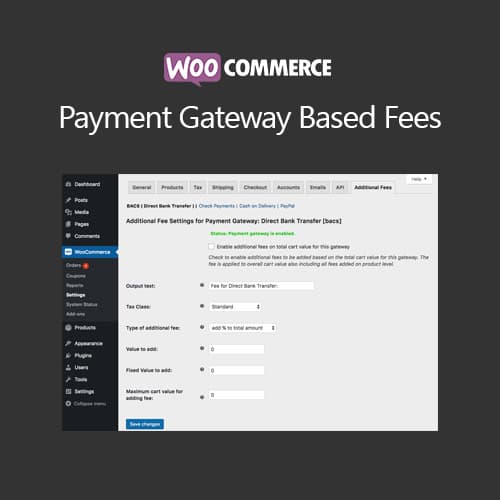
WooCommerce Payment Gateway Based Fees is a premium extension that allows store owners to implement conditional surcharges or discounts based on the selected payment method during checkout. This functionality addresses the common need to manage payment processing costs effectively by passing fees to customers or incentivizing specific payment methods. The extension supports both fixed and percentage-based fee calculations, providing flexibility in pricing strategies. It works seamlessly with all installed WooCommerce payment gateways, ensuring broad compatibility. Additionally, store owners can set conditional rules based on cart totals, product categories, and user roles, allowing for tailored customer experiences. This extension is essential for WooCommerce store owners aiming to optimize their checkout process and improve profitability. Available at PluginTheme.net with GPL license, instant download, and lifetime updates.
Key Features
Gateway-Based Fees
Add fixed or percentage fees to specific payment gateways at checkout
Conditional Rules
Apply fees based on cart total, product categories, user roles, and shipping methods
Discount Support
Offer negative fees as discounts to incentivize preferred payment methods
Transparent Display
Fees shown as clear line items on checkout page and order summaries
Who is this for?
Pros
- Supports both fixed and percentage-based fee calculations
- Works with all installed WooCommerce payment gateways
- Conditional rules based on cart total, categories, and user roles
- Can apply discounts to incentivize lower-cost payment methods
- Clear fee display on checkout for customer transparency
Cons
- •Complex conditional rules may require careful testing
- •Some payment gateway terms may restrict surcharge application
- •Fee display requires proper WooCommerce template compatibility
Product Description
WooCommerce Payment Gateway Based Fees enables store owners to add conditional fees or discounts based on the payment gateway selected during checkout. This addresses the common need to pass payment processing costs to customers or incentivize specific payment methods.
Fee Configuration
- Fixed amount or percentage-based fees per payment gateway
- Conditional fee rules based on cart total, product categories, or user roles
- Option to set minimum and maximum fee amounts
- Tax-inclusive or tax-exclusive fee calculations
- Support for all installed WooCommerce payment gateways
Discount Options
Beyond surcharges, the plugin can apply negative fees as discounts to encourage customers to use lower-cost payment methods like bank transfers or cash on delivery, helping reduce overall processing costs.
Display and Transparency
Fees appear as line items on the checkout page and order summary, providing transparency to customers about additional costs before they complete their purchase.
Our Verdict
PluginTheme Team
Expert Reviewer
This plugin effectively addresses payment processing cost management. The conditional rule system provides flexibility, and fees display transparently at checkout.