
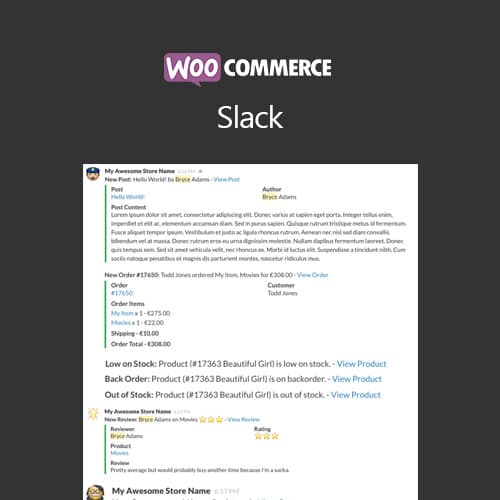
Send WooCommerce order and store notifications directly to your Slack channels
WooCommerce Slack
WooCommerce Slack sends store notifications to your Slack workspace channels. Receive real-time alerts for new orders, low stock, customer registrations, and other WooCommerce events directly in Slack.
Included with purchase:
- 100% GPL Licensed
- Lifetime Updates
- Technical Support
- Instant Download
Download for Free
Get this product and unlock 4,500+ premium plugins & themes for just $15.00/month.
What is WooCommerce Slack?
WooCommerce Slack is a premium WordPress plugin that connects your WooCommerce store with Slack for real-time notifications about store activities. This plugin is beneficial for eCommerce teams who want to stay updated on orders, inventory levels, customer activities, and product reviews without constantly checking the WooCommerce dashboard. Key features include real-time order alerts that keep teams responsive, configurable channel routing to direct notifications to relevant teams, low stock warnings to prevent inventory stockouts, and customizable message formats that include detailed order information. This plugin is designed for online store owners and their teams who use Slack for communication. It is compatible with the latest versions of WooCommerce and WordPress. Available at PluginTheme.net with GPL license, instant download, and lifetime updates.
Key Features
Order Alerts
Instant Slack notifications when customers place new orders
Inventory Warnings
Low stock alerts when products drop below configured thresholds
Channel Routing
Route different notification types to specific Slack channels
Customer Activity
Alerts for registrations, reviews, and account actions
Custom Messages
Configurable message format with order details and data fields
Who is this for?
Pros
- Real-time order alerts keep teams responsive
- Channel routing targets notifications to relevant teams
- Low stock warnings prevent inventory stockouts
- Customizable message format with order details
- Multiple notification types cover key store events
Cons
- •Requires Slack workspace with webhook access
- •High-volume stores may generate excessive notifications
- •Only useful for teams already using Slack
Product Description
WooCommerce Slack connects your online store with Slack for real-time notifications about store activity. The plugin sends customizable alerts to designated Slack channels, keeping your team informed about orders, inventory, and customer activity.
Notification Types
- New orders — Instant alerts when customers place orders
- Order status changes — Updates when orders move through fulfillment stages
- Low stock alerts — Warnings when product inventory drops below thresholds
- Customer registrations — Notifications for new account sign-ups
- Review submissions — Alerts when customers leave product reviews
Channel Configuration
Route different notification types to specific Slack channels. Send order alerts to a sales channel, inventory warnings to operations, and reviews to customer service. This targeted routing keeps teams focused on relevant information.
Message Customization
Customize notification message format, include order details, and configure which data fields appear in each Slack message. Rich message formatting with order totals and product details provides actionable context.
Our Verdict
PluginTheme Team
Expert Reviewer
Tested Slack integration on a demo store. Order notifications appear instantly in Slack with relevant order details. Channel routing keeps different teams informed without notification overload.
Expert Review

Related Products
More WooCommerce Plugins Products
View All →
WooCommerce Subscriptions
$4.49
Dokan Pro WordPress Plugin
$4.49
WooCommerce Smart Coupons
$4.49

AutomateWoo - Marketing Automation for WooCommerce
$4.49

Yoast WordPress WooCommerce SEO Premium
$4.49
WooCommerce Bookings
$4.49
WooCommerce Product Add-Ons
$4.49

WooLentor Pro – WooCommerce Page Builder Elementor Addon
$4.49